Deposit Process
Learn how to deposit funds into your PointsBazaar wallet using various payment methods.
How do I deposit using PayPal▼
1. Open your PayPal app. Then follow PayPal's official purchase video for step-by-step instructions on buying the required amount of PYUSD. Note that while the video uses Bitcoin as an example, the process for purchasing PYUSD is the same. For tips on choosing the correct payment method when purchasing PYUSDs, click here.
2. Navigate to your PointsBazaar wallet by selecting "Wallet" from the dropdown menu on the top right-hand corner on your PointsBazaar screen. Click Deposit. You should see your wallet address listed as well as a QR code that corresponds to your wallet address (example below).
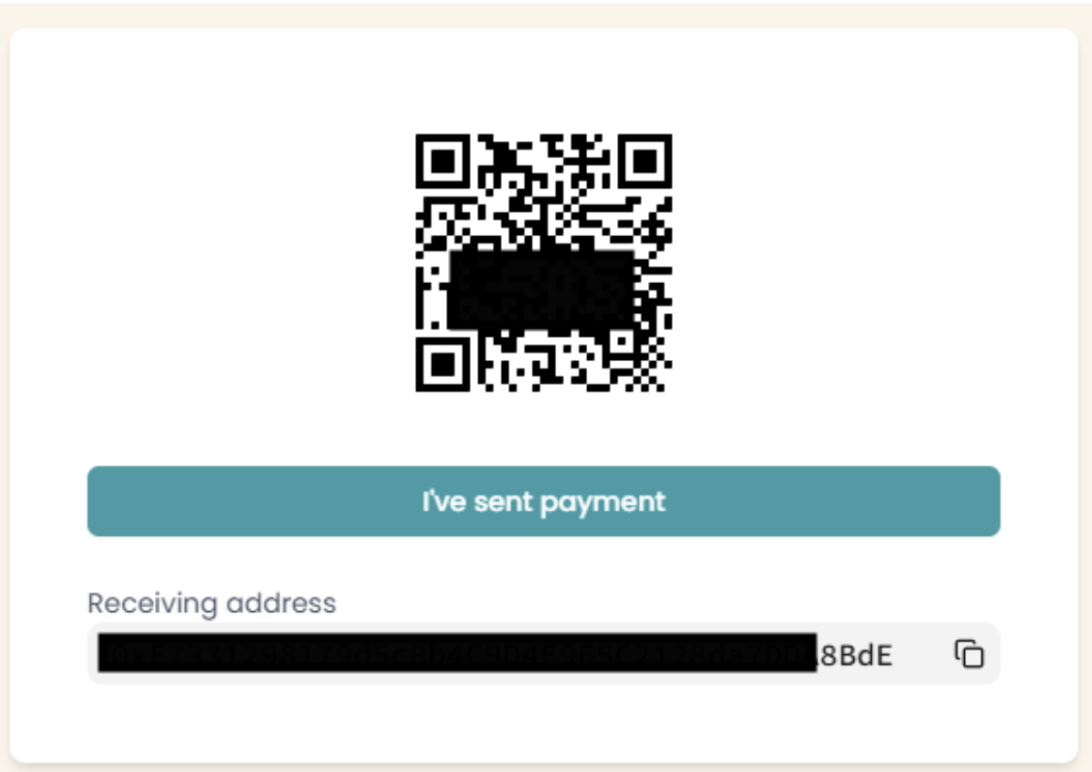
3. In the PayPal app, you can now either scan the QR code on PointsBazaar with your phone (recommended) or enter your wallet address manually.
4. Enter in the PYUSD amount you'd like to transfer.
5. Review the transfer details and tap Send Now.
6. Return to the PointsBazaar wallet interface and click "I've sent payment". This triggers a wallet sync, detects PYUSD, converts it to USDC, and deposits it into your wallet.
Note: For larger transfers, processing time may take longer—usually around 20–30 minutes.
How do I deposit using Venmo▼
Venmo now supports buying and holding cryptocurrencies directly in the app. Through this feature, users can easily purchase PayPal USD (PYUSD), a stablecoin that always equals one U.S. dollar. With Venmo's built-in crypto support, you can conveniently buy PYUSD and use it on our platform.
Please follow the steps below:
1. Open the Venmo app and tap the Crypto tab in the bottom navigation bar.
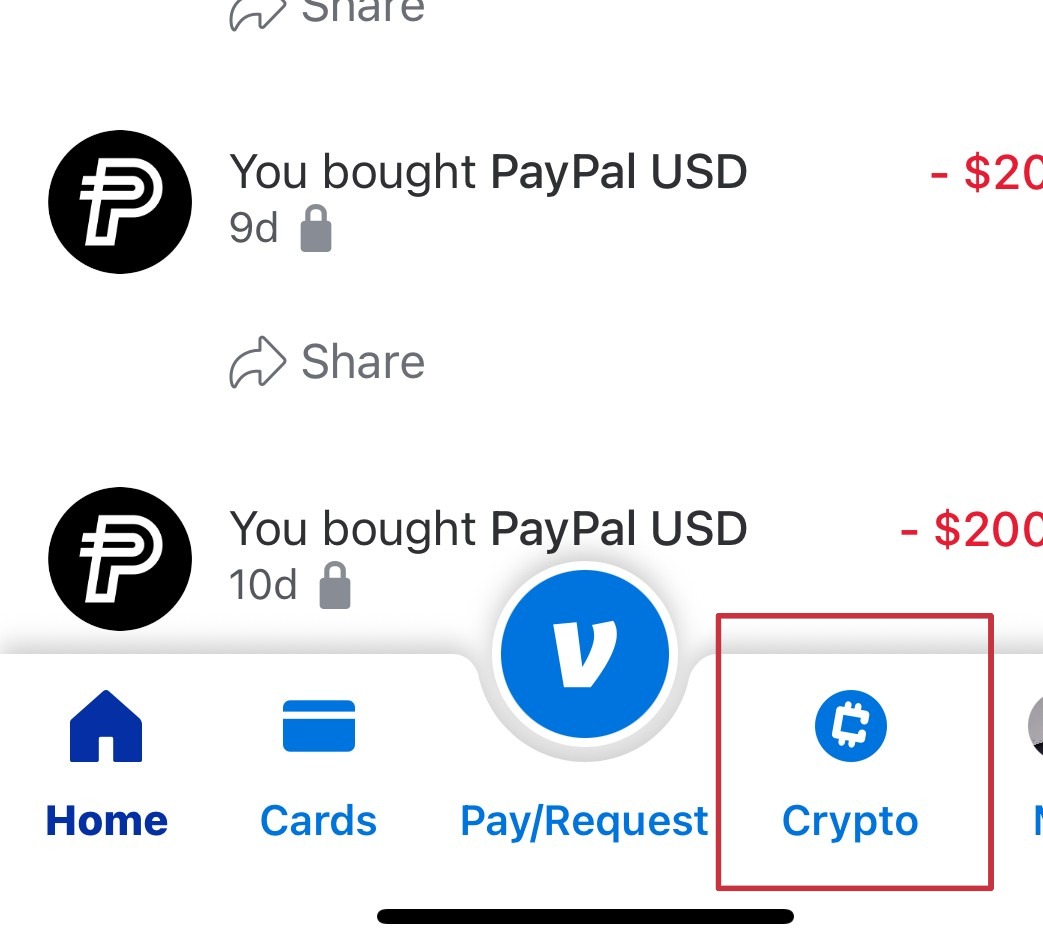
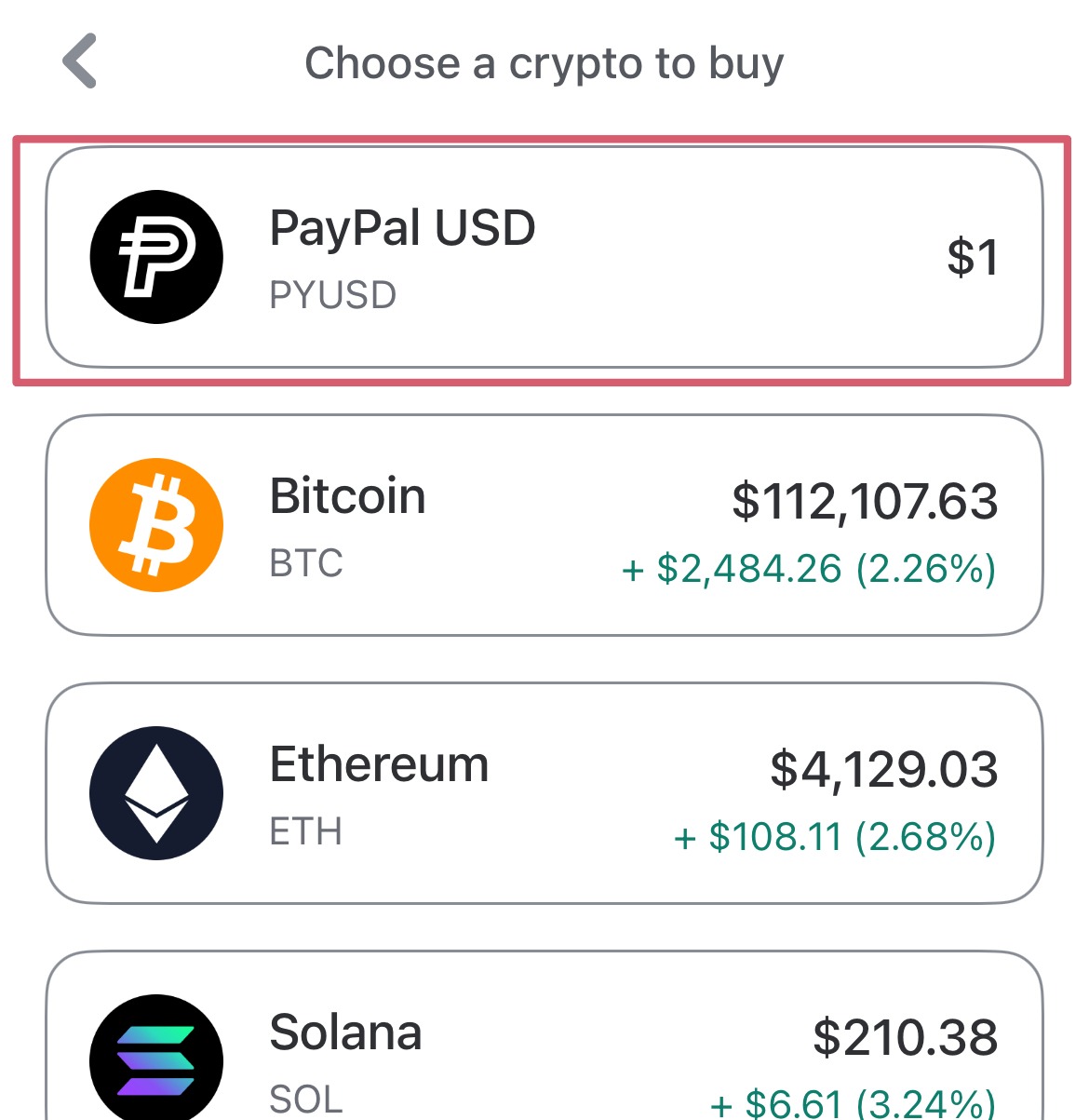
2. Select the Buy option, then select PYUSD as your cryptocurrency.
3. Enter the USD amount you'd like to spend, then tap Review. You can select different payment options directly on the Review screen:
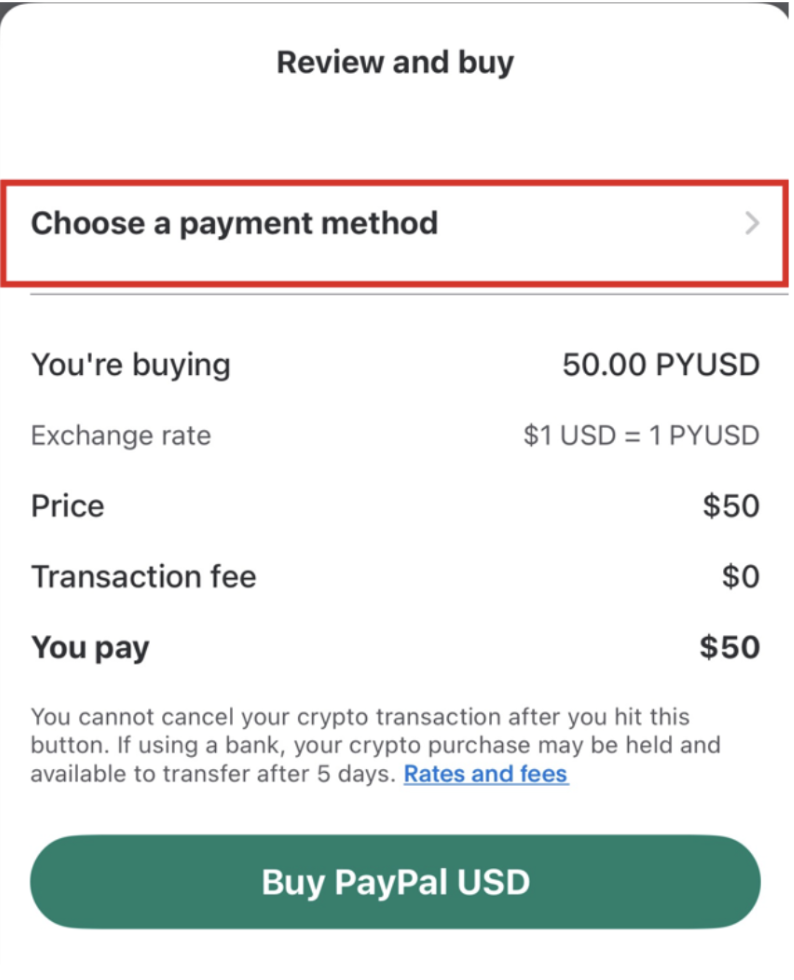
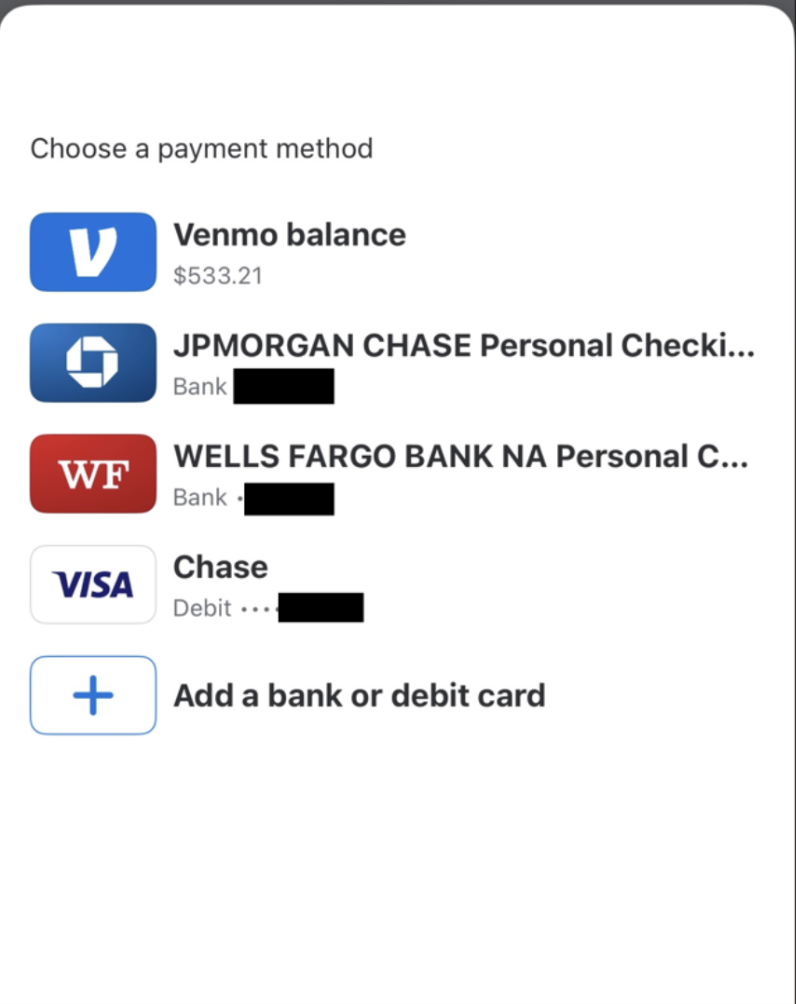
Tip 1: We recommend adding about $2 extra to cover the network fee charged by Venmo when you transfer PYUSD to our platform.
Tip 2: You can purchase PYUSD using several different methods. We recommend using a debit card, as it typically allows your PYUSD to be available for use almost immediately after purchase.
Tip 3: Some financial institutions may flag crypto-related transactions and decline the debit card purchase. If this happens, we recommend first using your debit card to add USD to your Venmo balance. Then, purchase PYUSD directly from your Venmo balance instead of using the card.
Tip 4: You can also purchase PYUSD directly using your bank account (e.g., checking account). However, because the funds are transferred directly from your bank, the transaction is typically subject to additional processing time — often around 5 business days before the PYUSD becomes fully available for use.
4. Confirm the transaction details—including how much PYUSD you'll receive (it's always 1 PYUSD = 1 USD), plus any applicable fees.
5. Tap Buy to complete your purchase. Your purchased PYUSD should be added to your crypto balance momentarily.
Transferring your PYUSD to PointsBazaar:
1. Navigate to your PointsBazaar wallet by selecting "Wallet" from the dropdown menu on the top right-hand corner on your PointsBazaar screen. Click Deposit. You should see your wallet address listed as well as a QR code that corresponds to your wallet address (example below).
2. In your Venmo app, navigate back to the Crypto tab. Select Send.
3. Select the PayPal USD (PYUSD) you just purchased.
4. If you used a desktop earlier, you can now scan the QR code on PointsBazaar with your phone. You can do so by selecting Scan a crypto address QR code on Venmo. If you've been using mobile all along, paste the Receiving Address (screenshot above) you copied into the top address bar.
5. Enter the amount you purchased (excluding the network fee).
6. Review the transfer details and tap Send.
7. Return to the PointsBazaar wallet interface and click “I’ve sent payment” (shown in the screenshot below). This action triggers a wallet sync, which detects the PYUSD you sent from Venmo, automatically converts it into USDC for use on the platform, and deposits it into your PointsBazaar wallet.
Note: For larger transfers, processing time may take longer—usually around 20–30 minutes. Please be patient while the transaction is confirmed.
What is Coinbase? How do I create an account with Coinbase▼
Coinbase is one of the world's most trusted cryptocurrency exchanges, providing an easy way to buy, sell, and store digital assets. With its secure platform and user-friendly interface, Coinbase is a convenient choice for purchasing USD Coin (USDC), which you can use directly on our platform.
Please follow these steps to create your Coinbase account:
1. Go to the Coinbase website or download the Coinbase app from the App Store (iOS) or Google Play (Android).
2. Tap Get Started and enter your full legal name, email address, and a secure password.
3. Verify your email address by clicking the confirmation link sent to your inbox.
4. Enter your phone number and complete SMS verification.
Provide your personal details as required by Coinbase, including date of birth, address, and the last four digits of your Social Security Number (U.S. users) or equivalent information depending on your country.
5. Upload a valid government-issued ID (such as a passport, driver's license, or national ID card) to complete identity verification.
6. Once approved, add a payment method (bank account, debit card, or PayPal in supported regions).
After completing these steps, your Coinbase account will be ready to use. You can then purchase USDC and transfer it to your wallet on our platform.
Will I be able to deposit using my credit card▼
PointsBazaar does not currently support credit card payments for 2 key reasons. First, we prioritize user security and never require you to share credit card information at any point throughout the transaction process. Second, credit card networks charge high fees. As a peer-to-peer marketplace, we do not believe any portion of the transaction should go to subsidizing credit card companies.
Why is my deposit taking so long to process▼
Large Deposit Amount
Processing large deposit amounts may take longer than usual. The required processing time may vary depending on the currency or network conditions. If your deposit has been pending for more than one hour, the delay may be caused by other reasons listed below
Deposit Amount Mismatch
If the amount you transferred does not match the amount specified when creating the deposit request on PointsBazaar, processing may be delayed. You can refer to this
Expired or Reused Deposit Address
Each deposit request generates a temporary deposit address that is valid for one-time use only. If you reuse a previously completed deposit address, your funds may take up to one day or longer to be credited. This behavior is not secure, and we strongly do not recommend reusing deposit addresses.
If none of the above resolves your issue, please contact us at services@pointsbazaar.com
What happens if my deposit amount specified by PointsBazaar doesn't match▼
When you make a deposit using Venmo or a Web3 Address, our platform will ask you to enter the exact transfer amount. If the amount you actually send does not match the amount you entered, the system will automatically adjust the difference.
Here's what happens in each case:
If you deposit more than the specified amount
- Example: You set the deposit amount to 100 USDC on PointsBazaar, but you actually transfer 150 USDC.
- You will immediately receive 100 USDC in your wallet.
- The extra 50 USDC will be credited in a separate transaction, usually within 30 minutes (sometimes up to a few hours).
If you deposit less than the specified amount
- Example: You set the deposit amount to 50 USDC on PointsBazaar, but you actually transfer 30 USDC.
- You will receive 30 USDC in your wallet in a separate transaction, typically within a few minutes to a few hours.
Note: Processing times for these adjustments may vary depending on network congestion, but your funds will always be credited correctly.
What is KYC (Know Your Customer)? Why is this needed▼
KYC (Know Your Customer) is a one-time identity verification process required for using financial and crypto platforms. It ensures transactions are safe, legal, and secure.
Why KYC is important:
- Regulatory compliance: Required by law to verify user identities
- Security: Helps prevent fraud, money laundering, and misuse
- Trust: Builds a safer environment for all users
- Access: Unlocks key features like deposits, withdrawals, and higher limits
What you'll need:
- A valid government-issued ID (passport, driver's license, or national ID)
- Sometimes, a proof of address (e.g., utility bill or bank statement)
Once verified, you'll have full access to all platform features.
How do I know PYUSDs are safe to use▼
PYUSD is 100% safe to use for the following reasons:
- Backed 1:1 by U.S. dollar reserves: Every PYUSD token is backed by cash deposits and short-term U.S. Treasuries.
- Issued by a regulated company: PayPal is a licensed and well-established financial company. Its stablecoin is managed by Paxos Trust Company, a regulated financial institution.
- Regular attestations: Independent third-party audits are published monthly to confirm that PYUSD reserves match the tokens in circulation.
- Price stability: Unlike other cryptocurrencies that fluctuate in value, PYUSD is designed to remain equal to the U.S. dollar.
- With these safeguards, PYUSD offers the stability of the U.S. dollar and the flexibility of crypto, making it a secure option for deposits and transactions on our platform.
What are PYUSDs? How do I know these are safe▼
PayPal USD (PYUSD) is a U.S. dollar–denominated stablecoin issued by PayPal. It is designed to always maintain a value of 1 PYUSD = 1 USD, making it a reliable digital currency for payments, transfers, and trading. Check out PayPal's official intro video of PYUSD here.