Withdrawal Process
Learn how to withdraw funds from your PointsBazaar wallet to external payment platforms.
How do I withdraw using Venmo/PayPal▼
Venmo supports transferring PayPal USD (PYUSD) between Venmo and external crypto wallets. To withdraw from PointsBazaar to Venmo, we send USDC to the PYUSD receiving address shown in your Venmo app. PYUSD is a U.S. dollar–pegged stablecoin managed by PayPal, and Venmo lets eligible U.S. customers buy/sell/hold PYUSD and transfer it to and from external wallets.
Please follow the steps below:
1. Open the Venmo app and tap the Crypto tab in the bottom navigation bar.
2. Select the Receive option, then select PYUSD as your cryptocurrency.
3. You will now see a QR code containing your Venmo wallet address as well as your wallet address listed at the bottom.
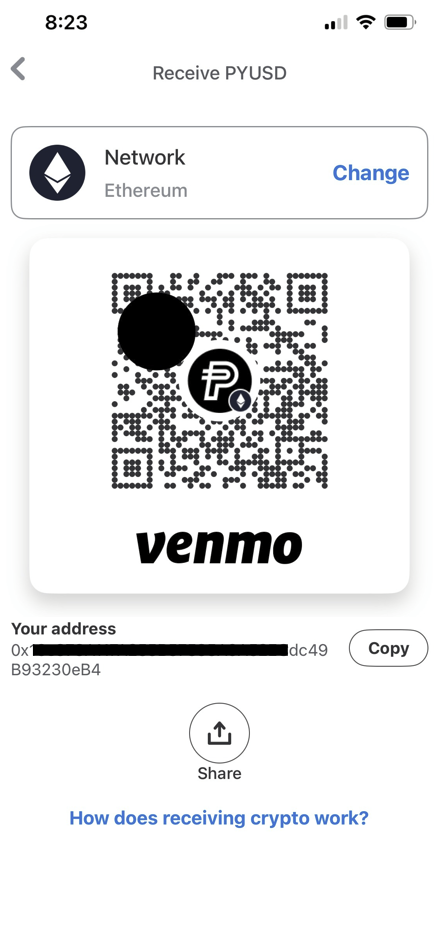
4. Navigate to your PointsBazaar wallet by selecting "Wallet" from the dropdown menu on the top right-hand corner on your PointsBazaar screen. Click Withdraw and select Venmo as your withdrawal method.
5. If you have a camera on your laptop, you can hold your Venmo QR code up to your camera and directly scan your QR code into PointsBazaar. Otherwise, you can copy the address from Venmo and paste it into the Recipient Address field.
6. Enter the amount you'd like to withdraw, then confirm.
After a few minutes, you will see the withdrawn amount reflected in your Venmo wallet, displayed as PYUSD.
Note: For larger transfers, processing time may take longer—usually around 20–30 minutes. Please be patient while the transaction is confirmed. Also, button labels and feature names on Venmo and PayPal may differ slightly, but the overall workflow is the same across both apps. Please reach out to services@pointsbazaar.com if you run into any issues.
Why has my withdrawal from PointsBazaar not shown up in my Venmo/PayPal yet▼
Most withdrawals take about 15–20 minutes to show up in Venmo or PayPal. In some cases, network congestion may cause delays, but the process should not take more than 30 minutes. If more than 30 minutes have passed and the funds still haven't arrived, please contact our support team (services@pointsbazaar.com) for further assistance.